Name your workflows
A number, a folder, a name. The number orders the folders and is hidden from the row.
# .github/workflows/gate-static-analysis.yml
name: 1 | Gate | Static Analysis Foldsmith
Browser extension · Chrome & Firefox
Foldsmith folds the GitHub Actions sidebar into collapsible folders — using the naming convention your repository already uses. Nothing to configure, nothing to install in your repo.
Live on the Chrome Web Store and on Mozilla Add-ons. Free, MIT licensed, no account needed.
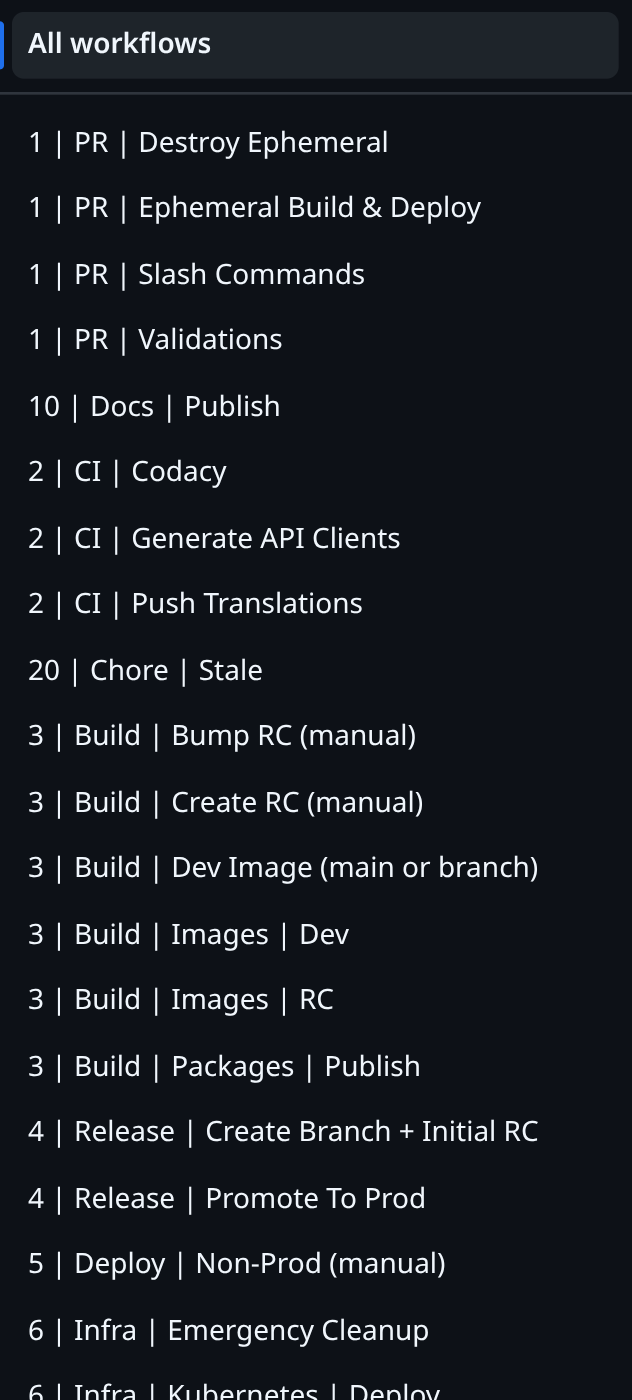
Before 33 workflows, one flat list
After 11 folders
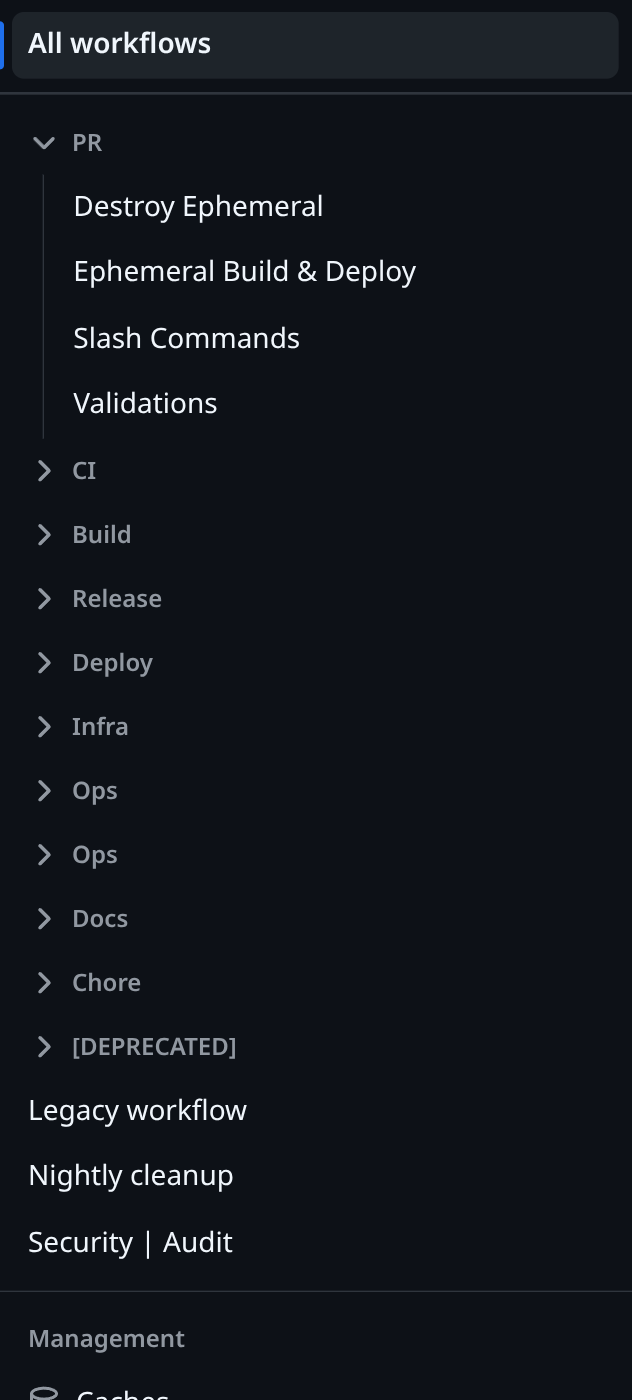
Foldsmith reads the workflow names GitHub has already rendered. It never calls an API, and it never touches a file in your repository.
A number, a folder, a name. The number orders the folders and is hidden from the row.
# .github/workflows/gate-static-analysis.yml
name: 1 | Gate | Static Analysis
Folders sort numerically — so 10 comes after 6, not after
1.
▼ Gate
    Static Analysis
    Comment Commands
▶ Quality
▶ PackageWorkflows that don't match your convention stay exactly where GitHub put them, below the folders.
▶ Platform
▶ [ARCHIVED]
Legacy runner
Midnight sweep
The default is {order} | {folder} | {name}, but the pattern is a field in
the popup. Use whatever your repo already does:
| Pattern | Matches |
|---|---|
{order} | {folder} | {name} |
3 | Package | Cut Candidate |
[{order}] {folder} - {name} |
[3] Package - Cut Candidate |
{folder} :: {name} |
Package :: Cut Candidate |
An invalid pattern shows an inline error and is never saved — your sidebar keeps working while you type.
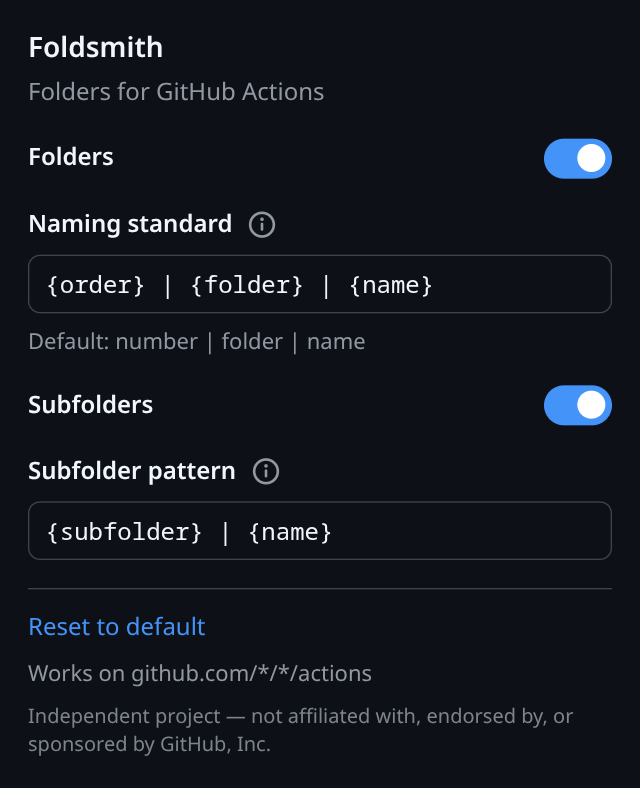
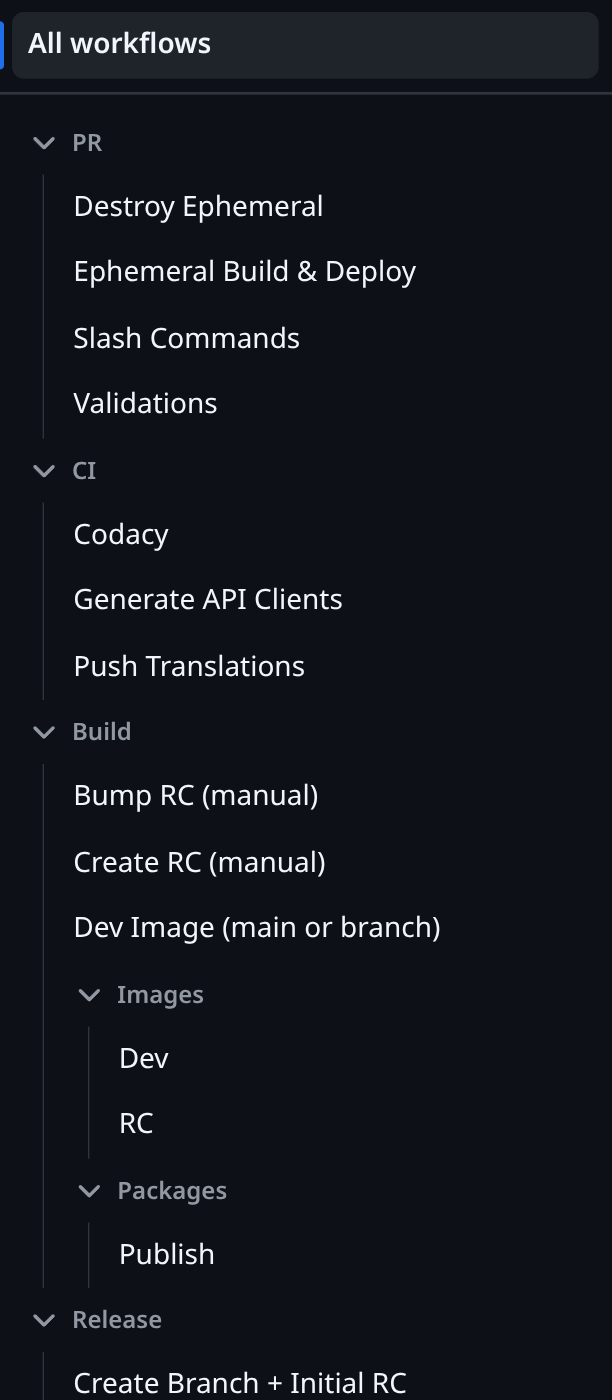
Turn them on and a second pattern applies to whatever is left, over and over. Extra separators in a name are preserved, never swallowed.
6 | Platform | Provision | Region | Apply
becomes Platform ▸ Provision ▸ Region ▸ Apply. A workflow with no
subfolder sits directly under its parent, where you'd expect it.
Foldsmith moves GitHub's own elements instead of recreating them, so navigation, pinned workflows, the selected row and keyboard access are GitHub's — untouched.
Switch it off and the original list comes back exactly as it was, full workflow names and original order included.
The row is shortened; GitHub's own tooltip is left alone. Screen readers keep announcing the complete workflow name.
Turbo page changes and “Show more workflows…” are handled — the folders come back on their own.
This runs the extension's actual parser — the same file, copied unchanged. Paste your own workflow names and see exactly what your sidebar would look like.
Starting the demo… If this message stays, the page is being opened straight from disk
— browsers block scripts like this one on file:// URLs. Serve the folder
over http (python3 -m http.server -d public) or use the published page.
There is nothing to install on GitHub's side — you are only editing the
name: field at the top of each workflow file. Rename one to try it; the rest
keep working untouched.
Pick a number and a folder for each workflow, and put them in the name:
# .github/workflows/quality-tests.yml
name: 2 | Quality | Tests       ← was: Tests

on:
  pull_request:
Group anything that belongs together under the same number and folder:
name: 2 | Quality | Tests
name: 2 | Quality | Lint Locales
name: 2 | Quality | Coverage Report
Need a level deeper? Add another separator and turn subfolders on in the popup:
name: 6 | Platform | Provision | Plan
name: 6 | Platform | Provision | Apply
Commit, open the Actions tab, and the folders are there. Workflow names are display-only — renaming one does not change its file, its triggers, its history, or its badge URL.
Foldsmith collects no data. There is no account, no server, and no analytics — and that is verifiable, not a promise.
That's the whole list. Uninstalling removes it. Foldsmith is injected only on
github.com/*/*/actions pages and nowhere else.
This page holds itself to the same standard: no analytics, no tracking pixels, no cookies, and no third-party requests — not even a web font. The only script it loads is the demo above, which is the extension's own parser running locally in your browser. Check it in your devtools network tab.
Foldsmith is on the Chrome Web Store and Mozilla Add-ons. Nothing to sign up for — install it and open any repository's Actions tab.
Chrome Web Store — free, MIT licensed.
Mozilla Add-ons — free, MIT licensed.
Yes. Foldsmith reads the page your browser has already loaded, so whatever you can see, it can fold. It never authenticates as you, because it never talks to anything.
Only if you want folders. Workflows that don't match the pattern are left exactly where they are — so you can adopt the convention one workflow at a time, and nothing breaks in the meantime.
Foldsmith does nothing and GitHub stays completely usable. Finding the sidebar is deliberately isolated to one small file, so a redesign is a quick fix rather than a rewrite.
No. Foldsmith is an independent project, built by AxeForging, with no affiliation to GitHub, Inc. See the note in the footer.